How to Manage Backlinks: A 5-Step Routine for Link Builders
Published on October 14, 2026 | 8 Min Read
Key takeaways
- Backlink management covers the links you build on purpose: exchanges, paid placements, guest posts and listings.
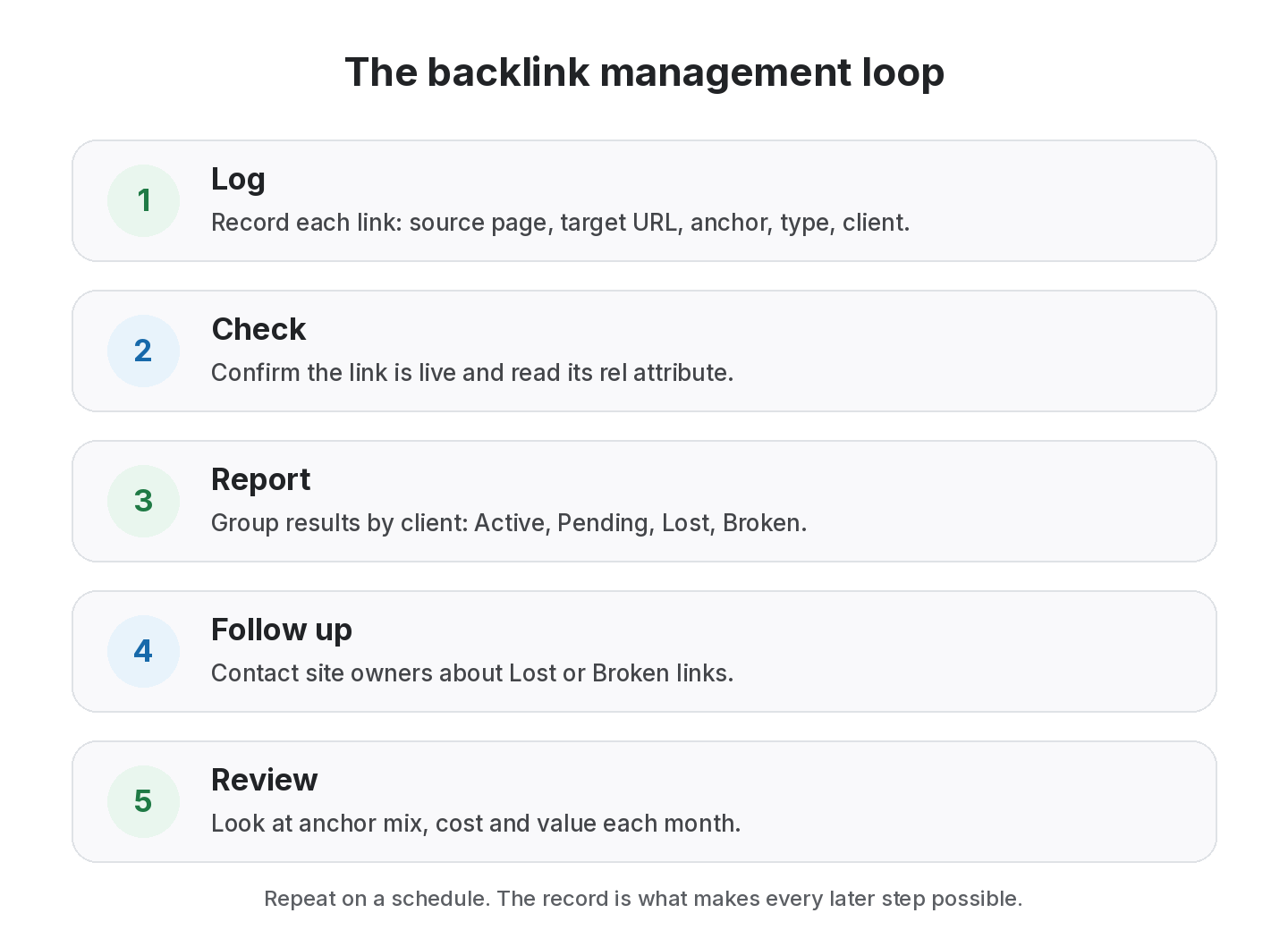
- The core loop is log, check, report, follow up and review.
- Record the source page, target URL, anchor text, link type, client and cost for every link.
- A spreadsheet works for a few dozen links. Past that, a backlink management tool saves the rechecking time.
To manage backlinks well, you need three things: one record of every link you build, a regular check that each link is still live and marked up the way you agreed, and a habit of acting when something changes. This guide walks through a five-step routine you can run with a spreadsheet or a tool. The method matters more than the software: if a link isn’t recorded, nobody notices when it disappears.
Ways to manage backlinks at a glance
| Method | Best for | Where it struggles |
|---|---|---|
| Notes and email threads | A handful of one-off links | Nothing is searchable or rechecked |
| Spreadsheet | Up to a few dozen links, one person | Manual rechecks, version drift, no alerts |
| Backlink checker (crawler index) | Seeing links others gave you | Doesn’t know your deals, prices or clients |
| Backlink manager | Links you build on purpose, by client | Needs the habit of logging every deal |
A spreadsheet works best when you manage a few dozen backlinks yourself, but falls short once several people, clients or link types are involved.
What does it mean to manage backlinks?
Most SEO tools focus on backlink discovery: crawling the web to find who links to you. Backlink management is different. It starts with the links you or your team worked to get, and it answers practical questions about them. Is this link still there? Is it still dofollow? Which client is it for? What did it cost? Did the partner get their link back?
That difference matters because a crawler’s index can tell you a link exists, but it can’t tell you that you paid for it, that it was part of a three-way exchange, or that the guest post was promised to stay live for a year. Only your own records can.
Why links need managing at all
Links change after they go live, and nobody sends you a message when they do. Pages get redesigned, posts are unpublished, sites change owners, and editors add rel=”nofollow” to outbound links. Google’s own guidance on qualifying outbound links gives site owners several attributes to mark links with, so a link you agreed as a standard editorial link can legitimately change type later. If you’re paying for links, building them for clients or trading them with partners, each of those changes is something you need to know about.
Who needs backlink management?
Anyone who builds links on purpose. That includes agencies building links for several clients, in-house SEO teams with a link budget, freelancers who trade links between client sites, and business owners doing their own outreach. If you can name the links you’ve worked for, you have something to manage.
The backlink management loop
Manage every backlink in one list
Log links by client and type, then check them all at once. Free for up to 20 links.
1. Log every link in one place
Use one list for every link, whatever its source. For each link, record at least:
- Source page: the exact URL where the link sits, not just the domain.
- Target URL: the page on your or your client’s site that it points to.
- Anchor text: the clickable words.
- Link type: exchange, ABC exchange, paid, guest post, listing or other.
- Client and project: who the link is for.
- Cost or terms: the price, the swap or the promise involved.
- Date live: when it was first confirmed.
2. Check that each link is live
A check means opening the source page and confirming three things: the page loads, your link is on it and pointing at the right URL, and its rel attribute is what you expect. For a handful of links you can do this by hand with your browser’s “view source”. For hundreds, it needs automating.
3. Report by client
Group results so that each client or project sees only its own links, with a clear status for each. A short summary of how many are active, pending, lost or broken is usually what people read first. Our guide to the link building report template shows a structure that works.
4. Follow up on changes
A lost or broken link is a conversation, not a statistic. Contact the site owner with the exact page, the anchor and the date it went live. If you paid for it, refer to what you agreed. If it was an exchange, check that your side is still in place too.
5. Review the bigger picture
Once a month or a quarter, step back and look at patterns. Is one anchor phrase showing up too often? Are most new links coming from exchanges? Which link types gave the best value for the money and time spent? These questions are where record keeping turns into strategy.
Spreadsheet or backlink management software?
Plenty of teams start with a spreadsheet, and that’s fine. It is free, flexible and familiar. The trouble starts when it grows. Rechecking each row by hand takes time, columns drift between team members, and statuses go stale because no one updates them.
| Need | Spreadsheet | Backlink management tool |
|---|---|---|
| Log links | Yes, any columns you like | Yes, with consistent fields |
| Check links are live | By hand, row by row | Checks the source page for you |
| Spot nofollow changes | Only if you inspect the HTML | Reads the rel attribute on each check |
| Separate clients | Separate tabs or files | Built-in client and project views |
| Share with clients | Share the file, or copy into a report | Read-only share links and reports |
A useful rule of thumb: once rechecking takes longer than the time you’d spend setting up a tool, it’s time to switch. We wrote more about this on our backlink spreadsheet alternative page.
What to look for in a tool to manage backlinks
- Every link type in one list, so exchanges, paid links and guest posts don’t live in separate places.
- Clear statuses and link types, such as Active, Lost, Broken, Dofollow and Nofollow.
- Checks you don’t have to remember, either one click for everything or a schedule.
- Client separation and sharing, if you work for more than one brand.
- Import and export, so your existing spreadsheet comes with you and your data can leave.
- Honest scope. A management tool checks the links you log. It is not a replacement for a crawler-based backlink index, and the two work well together.
Worked example: moving from a spreadsheet
Sample data. The figures below are invented to illustrate the process.
An agency manages links for two clients, example-saas.com and example-shop.com, in a shared spreadsheet with 18 rows. Nobody has rechecked it in three months. They export the sheet as CSV, import it into a backlink manager and run a check on every link.
| Client | Links | Active | Pending | Lost | Broken |
|---|---|---|---|---|---|
| example-saas.com | 11 | 8 | 1 | 1 | 1 |
| example-shop.com | 7 | 5 | 0 | 2 | 0 |
| Total | 18 | 13 | 1 | 3 | 1 |
Four links need attention. The broken one turns out to be a guest post whose URL changed, and the editor fixes the redirect within a day. Two of the three lost links were from a site redesign, and both are restored after a polite email with the original details. The pending link was simply added the day before and hadn’t been checked yet. None of this was visible in the spreadsheet, which still said “Live” on every row.
Common mistakes when you manage backlinks
Most link loss we hear about isn’t caused by a bad partner. It comes from small gaps in the routine.
- Logging only the target URL: without the exact source page, you can’t recheck the link or prove it existed.
- No agreed rel value: if you never wrote down that a link should be a normal link, you can’t tell when it is switched to nofollow.
- Checking only once: a link confirmed on day one tells you nothing about month six. Pages get edited, migrated and pruned.
- Mixing clients in one tab: reporting then means filtering by hand, and mistakes reach clients.
- Ignoring Pending links: deals that never go live quietly drain budget. Give every Pending link a follow-up date.
- Deleting lost links: keep them with a Lost status. The history is useful when you review partners or renegotiate.
Each of these is cheap to fix at the moment you add a link and expensive to fix six months later. If you suspect your list is already out of date, start with a backlink audit of the links you built, then run the routine above from a clean baseline.
How to choose a way to manage backlinks
Use this checklist to decide whether your current setup is still enough.
- Volume: how many links do you add each month? If rechecking takes longer than an hour, you have outgrown manual checks.
- People: does more than one person add links? Shared sheets drift quickly without fixed columns and statuses.
- Clients: do you need to show each client only their own links?
- Link types: do you mix exchanges, paid placements, guest posts and listings? Each has different fields worth recording.
- Proof: can you show when a link went live and when it was last confirmed?
- Exit: can you export everything to CSV if you change tools?
If you answer “yes” to three or more, a dedicated backlink manager will usually save time. If not, a well-structured sheet is fine. Our backlink tracker template lists the columns to start with.
How SEOENV helps
SEOENV is a backlink management tool built around that loop. Every link you add, whether through Master Link Exchange, ABC Link Exchange, Paid Collaborations, Guest Posts or Listing Backlinks, lands in the Link Tracker with a status and a link type. You can bring your existing sheet in with CSV import and export and keep clients separate with Clients.
The Free plan covers every link type for up to 20 links, with manual checks using Check all. Starter adds automatic daily checks, the Link Status Report and the ROI Calculator. See all plans on the pricing page, or read more about backlink monitoring.
From the SEOENV team
The teams that kept their links healthy weren’t the ones with the cleverest process. They were the ones who logged links on the day they went live, while the details were fresh. Trying to rebuild a link history from old emails months later is where most of the gaps come from.
Sources
- Google Search Central: Qualify your outbound links to Google
- Google Search Central: Spam policies for Google web search
- Google Search Central: SEO Starter Guide
How we wrote this guide
This guide is written by the SEOENV team from how link builders actually record exchanges, paid placements and guest posts. SEOENV makes a backlink manager, so we say where a spreadsheet or another tool is enough. We do not quote statistics we cannot source.
Frequently asked questions
Keep every link you build on record
Log exchanges, ABC swaps, paid links and guest posts in one place. The Free plan covers every link type for up to 20 links.


Leave A Comment