Link Building Report Template: What to Include Each Month
Published on October 14, 2026 | 8 Min Read
Key takeaways
- Lead with a short summary: links built, links live, links lost, and what you did about it.
- Include the full link list with source page, target URL, anchor, type and status, so every claim can be verified.
- Report losses honestly, with the fix, rather than only showing new wins.
- Use the same template every month so trends are easy to compare.
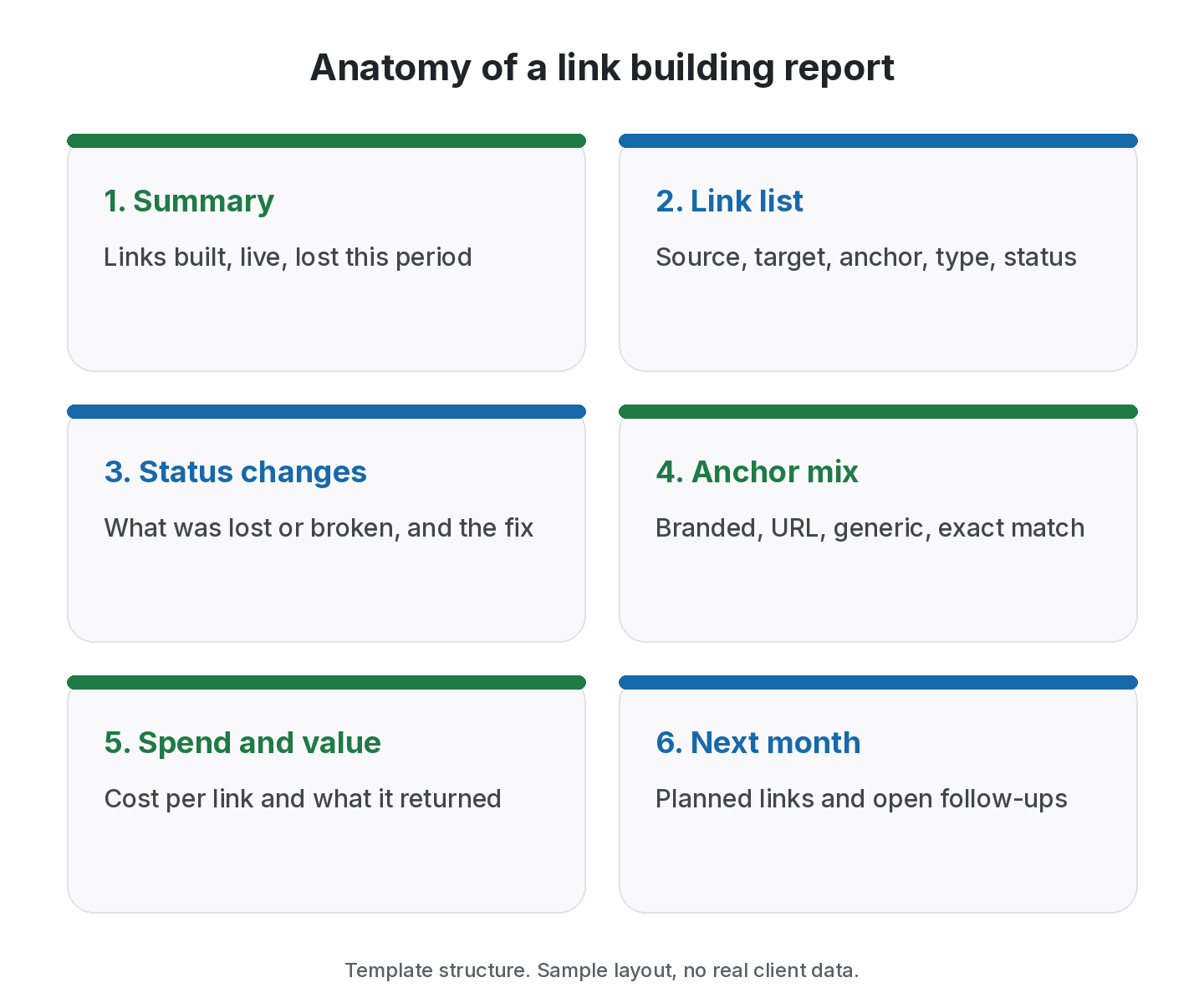
A link building report shows what links were built in a period, whether they are still live, what changed, and what happens next. A good link building report template has six parts: a summary, the full link list, status changes, anchor text mix, spend and value, and next month’s plan. Keep it short enough to read in five minutes and specific enough that a client can check any link themselves.
Report sections at a glance
| Section | What it answers | Who reads it most |
|---|---|---|
| Summary | What happened this month? | Client decision-maker |
| Link list | Which links, where, with which anchor? | Client SEO lead |
| Status changes | What was lost or broken, and the fix | Both |
| Anchor mix | Is the profile staying natural? | Client SEO lead |
| Spend and value | What did it cost and return? | Finance / owner |
| Next month | What is planned and pending? | Both |
A six-part report works best for monthly retainers, but falls short if you leave out lost links: clients trust reports that show problems as well as wins.
What is a link building report?
A link building report is a regular update, usually monthly, from whoever builds links to whoever pays for or depends on them. For agencies, that’s the client. For in-house teams, it’s a manager or the business owner. Its purpose is accountability: proving that the links exist, showing they are still working and explaining the plan.
The best reports don’t try to impress with volume. They make it easy for the reader to trust the work. That means showing each link, being clear about which ones were lost, and keeping estimates and promises out of it.
What to include in a link building report template
Share link reports without a spreadsheet
Send a client share link, or add your logo on Growth.
1. Summary
Three or four lines at the top. How many links were built this period, how many are live in total, how many were lost or broken, and one sentence on the most important action taken. Many readers will stop here, so make it accurate.
2. Link list
Every link built in the period, and ideally the running total, with these columns:
- Source page (the exact URL)
- Target URL
- Anchor text
- Link type: exchange, ABC exchange, paid, guest post or listing
- Status: Active, Pending, Lost or Broken
- Rel type: Dofollow or Nofollow
- Date live
This is the section that earns trust, because anyone can click through and check.
3. Status changes
List links that changed since the last report: lost, broken, or switched from dofollow to nofollow. For each, say what you did. “Contacted site owner on 4 June, link restored on 9 June” is far more useful than a red cell in a spreadsheet.
4. Anchor text mix
Show how anchors are distributed: branded, plain URL, generic (“this guide”) and exact or partial keyword match. Google’s guidance on writing good anchor text asks for descriptive, natural anchors. Avoid aiming for a fixed “safe” ratio. Instead, flag when one exact phrase starts to dominate.
5. Spend and value
If links were paid for, show what each cost and the total for the period. Where you have it, add what the links returned, such as referral sessions or leads from analytics. Mark any estimates clearly as estimates.
6. Next month
The links in progress, the outreach planned and any open follow-ups on lost links. This turns the report from a look back into a plan.
Optional sections worth adding
Some readers want more detail. Add these only if your client asks for them: a domain-level view showing how many links come from each referring site, a breakdown by link type (exchanges, paid, guest posts, listings), and a short notes section for anything unusual, such as a partner site changing owner.
How to report link building to clients
- Pick a fixed reporting date and stick to it, so clients know when to expect it.
- Run a full check just before you report. A report built on statuses from last month isn’t accurate.
- Separate clients completely. Never send a sheet that includes another client’s links.
- Write the summary last, once you know what the data says.
- Share a link the client can open, rather than a static file that’s out of date the next day.
- Keep the language plain. Explain dofollow and nofollow once, in a footnote, rather than assuming the reader knows. Our guide to nofollow vs dofollow can help.
Worked example: a monthly report
Sample data. The client, domains and figures are invented to illustrate the template.
Summary for example-shop.com, May. Six links built this month, 24 live in total. One link lost and one broken; the broken link has been fixed and the lost one is with the site owner. Spend this month: $420 on two sponsored placements.
| Source page | Anchor | Type | Rel | Status |
|---|---|---|---|---|
| gardening-blog.example/tool-guide | example-shop.com | Guest post | Dofollow | Active |
| outdoor-news.example/spring-picks | best pruning shears | Paid | Nofollow | Active |
| diy-hub.example/resources | Example Shop | Listing | Dofollow | Active |
| garden-forum.example/thread-88 | this buying guide | Exchange | Dofollow | Pending |
| home-mag.example/gift-ideas | garden gift ideas | Paid | Nofollow | Active |
| landscaping.example/partners | Example Shop | ABC exchange | Dofollow | Active |
Status changes. old-blog.example/tools went Lost after a redesign; we emailed the editor on 12 May. patio.example/guide was Broken (404) after a URL change; the owner added a redirect and it’s now Active.
Anchor mix (24 live links). Branded 10, URL 5, generic 4, partial match 4, exact match 1. No action needed.
Next month. Three guest posts in writing, one exchange awaiting the partner’s side, and a follow-up on the lost link.
Notice that the paid placements show as Nofollow. That’s expected: paid links should be qualified, as Google’s guidance on outbound links explains.
A copy-ready link building report template
Copy these headings into a document or a spreadsheet and fill them in each month:
- Report period and client
- Summary: links built, total live, lost, broken, key action
- Link list: source page, target URL, anchor, type, rel, status, date live
- Status changes and fixes
- Anchor mix: branded, URL, generic, partial match, exact match
- Spend and value: cost per link, total, results with source
- Next month: in progress, planned, open follow-ups
Common link building report mistakes
Most reports that lose a client’s trust make one of a handful of mistakes:
- Counting links, not checking them. A total that includes links nobody has rechecked in months overstates the work. Always report the status from a fresh check.
- Hiding nofollow and paid links. Mixing sponsored placements into an editorial list without labels makes the profile look different from what it is. Label link type and rel value on every row.
- Reporting domains instead of pages. “Link from industry-news.example” can’t be verified. The exact source URL can.
- Changing the format every month. If the columns move, trends become impossible to compare. Keep the template fixed and add notes when you need to explain something new.
- Promising outcomes the links can’t guarantee. Links are one input among many. Report what was built and what you can measure, and keep forecasts out of the main report.
- Leaving out next steps. A report that ends with a table leaves the client to work out what happens next. Always close with the plan.
Link building report vs SEO report
A link building report is narrower than a full SEO report, and keeping it that way makes it easier to read.
- A link building report answers: which links did we build, are they live, what did they cost and what changed? It is about the work and its evidence.
- An SEO report covers rankings, traffic, technical health and content. Links are one input among many.
Mixing the two often leads to over-claiming, for example crediting a ranking jump to three new links when a content update shipped the same week. We suggest keeping the link report factual and linking to the wider SEO report for outcomes. Where you do discuss impact, say what you measured and what else changed in the same period.
Keep the data consistent month to month
Use the same statuses (Active, Pending, Lost, Broken), the same link types and the same date ranges in every report. Clients compare months side by side, and a changed definition looks like a change in results. If you must change a definition, add a one-line note at the top of the report explaining why.
How to choose what goes in your report
Not every client needs every section. Use this checklist to fit the template to the account.
- Retainer size: small retainers often need only the summary, link list and status changes.
- Who pays for links: if the client funds paid placements, always include spend and value.
- Client’s SEO maturity: in-house SEO teams usually want anchors and rel values; owners usually want a short summary.
- Contract terms: if you promise replacement of lost links, report losses and replacements in the same table.
- Frequency: monthly suits most retainers; a short weekly status note works for launches.
- Delivery: decide between a PDF, a branded report or a live share link that the client can open any time.
Whatever you cut, keep the link list and status changes. Those two sections are the evidence behind every other number. For the metrics to put in the summary, see link building KPIs.
How SEOENV helps with link building reports
SEOENV keeps the link list up to date for you. Each link you log appears in the Link Tracker with its status and type, grouped by client. On every plan, you can send clients a read-only report with client share links, and run Check all before you report.
Starter ($29 a month) adds the Link Status Report, which groups Active, Pending, Lost and Broken links per client, along with automatic daily checks. Growth ($149 a month) adds the Anchor Text Heatmap for the anchor mix section and white-label reports through Report Branding. See our link building reports page or the pricing page for details.
From the SEOENV team
Clients rarely complained about a lost link that was reported with a fix. They complained when they found it themselves. Putting losses near the top of the report, with what was done, built more trust than any chart of new links.
Sources
- Google Search Central: Link best practices for Google, including anchor text
- Google Search Central: Qualify your outbound links to Google
- Google Search Central: Spam policies for Google web search
How we wrote this guide
This guide is written by the SEOENV team from how link builders actually record exchanges, paid placements and guest posts. SEOENV makes a backlink manager, so we say where a spreadsheet or another tool is enough. We do not quote statistics we cannot source.
Frequently asked questions
Related reading
Keep every link you build on record
Log exchanges, ABC swaps, paid links and guest posts in one place. The Free plan covers every link type for up to 20 links.


[…] of how many are active, pending, lost or broken is usually what people read first. Our guide to the link building report template shows a structure that […]