Guest Post Outreach Email Template (Plus Follow-Ups That Work)
Published on October 14, 2026 | 6 Min Read
Key takeaways
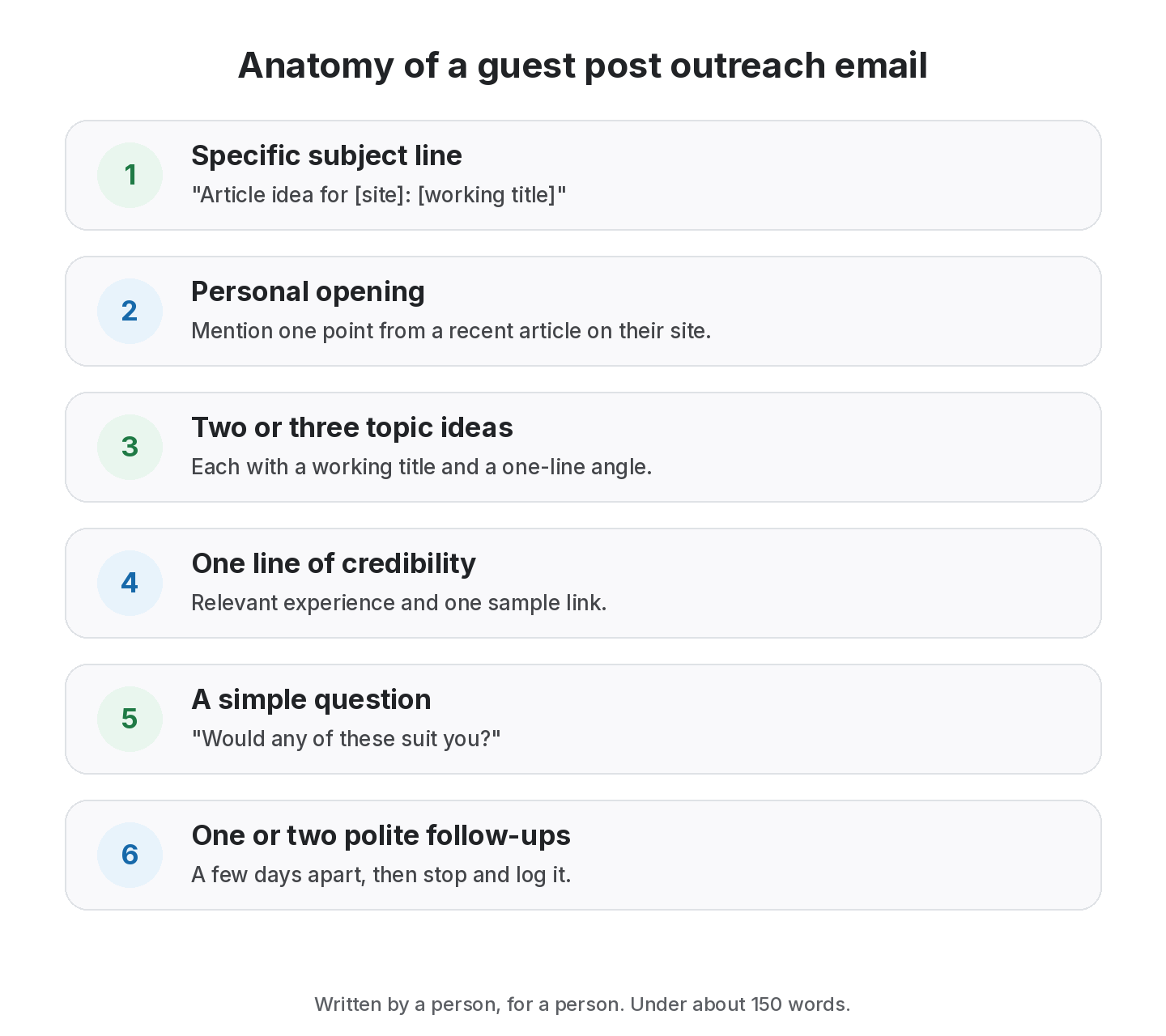
- A good guest post outreach email is short, specific to the site and offers concrete topic ideas.
- Personalise from real reading: mention a recent article and why your idea fits their readers.
- Pitch two or three topics with working titles and a one-line angle each.
- Follow up once or twice, politely, a few days apart, then stop.
- Log every pitch, reply and follow-up date so nobody contacts the same editor twice.
A guest post outreach email is a short message to an editor proposing an article you’d write for their site. The emails that get replies are specific: they show you’ve read the site, they propose concrete topics that suit its readers, and they make saying yes easy. The ones that get ignored are generic, long and obviously sent to hundreds of people. This guide gives you a guest post outreach email template, two follow-ups, subject line ideas and a simple way to track every pitch. All of it is written to be sent by a person, to a person.
Guest post outreach email: what works at a glance
| Element | Do | Avoid |
|---|---|---|
| Subject line | Name the topic or the site | “Guest post opportunity!!!” |
| Opening | Mention a specific recent article | “I love your blog” with no detail |
| Pitch | 2–3 topic ideas with an angle | One vague idea or a list of ten |
| Credibility | One line of relevant experience | A full bio and portfolio dump |
| Links | Mention your link policy honestly if asked | Leading with “dofollow link” |
| Length | Under 150 words | Several paragraphs |
| Follow-ups | 1–2 polite nudges | Daily reminders |
A short, personalised guest post outreach email works best for editors who accept contributors, but falls short when it’s sent unchanged to a long list.
Before you write: do the homework
An outreach email is only as good as the research behind it. Before you write, spend a few minutes on:
- The editor’s name: check the masthead, author pages or contributor guidelines.
- Recent articles: read two or three, and note a gap your idea could fill.
- Guidelines: word count, topics they won’t take, link policy, any fees.
- Topic overlap: make sure they haven’t already covered your idea.
This is also where you decide whether the site is worth writing for. Our guest posting process covers how to qualify sites before pitching.
Guest post outreach email template
Adapt every line. The brackets are prompts, not mail-merge fields.
Subject: Article idea for [site name]: [working title]
Hi [first name],
I enjoyed your recent piece on [specific article], especially [one specific point]. It got me thinking about a follow-up angle your readers might find useful.
Here are three ideas I could write for [site name]:
- [Working title 1]: [one-line angle and who it helps]
- [Working title 2]: [one-line angle]
- [Working title 3]: [one-line angle]
I [one line of relevant experience, for example “run link building for B2B SaaS teams and write about it at [your site]”]. Happy to follow your guidelines and send an outline first.
Would any of these suit you?
Thanks,
[Your name] [Role, company, link to one relevant sample]
Why this template works
- It proves you read the site. The specific article and point can’t be faked at scale.
- It offers choices. Three ideas make it easier for an editor to say yes to one.
- It’s about their readers. Every line explains value to their audience, not to you.
- It doesn’t lead with links. You’ll agree link details later, honestly, once the topic is accepted.
Keep every pitch and follow-up in one place
Log the editor, the topic and the date of each email, then move the post to Live when it’s published.
Subject line ideas
Short and specific beats clever. Some patterns:
- “Article idea for [site]: [working title]”
- “[Working title]: guest post pitch”
- “Follow-up idea to your [topic] article”
- “Question about contributing to [site]”
Avoid ALL CAPS, emoji and anything that sounds like a sales blast.
Follow-up emails
Editors are busy, and a polite follow-up often gets the reply. Two are enough.
Follow-up 1 (a few days later):
“Hi [first name], just bringing this to the top of your inbox in case it’s useful. Happy to send an outline for any of the ideas below. Thanks, [name]”
Follow-up 2 (about a week later):
“Hi [first name], I’ll leave this here so I don’t fill your inbox. If the timing’s ever right for an article on [topic], I’d be glad to help. All the best, [name]”
Then stop. Log the pitch as “no reply” with a date. You can pitch a different idea months later.
When the editor says yes
Reply quickly and confirm the details in one email:
- the chosen topic and an outline;
- word count and deadline;
- where a link to your site would fit and which page it points to;
- the anchor text, kept natural;
- the link’s rel value, and any fee. If you pay to publish, the link is a paid link, and Google asks for rel=”sponsored” (nofollow also accepted).
Write this down. It’s the record you’ll refer to if the link changes later.
Common outreach mistakes
- Copy-paste personalisation. “I loved your article on [Title]” with a mismatched title.
- Pitching topics they’ve already covered. A quick site search prevents this.
- Asking for a “dofollow link” in the first email. It signals that the article is an afterthought.
- Over-long emails. If it doesn’t fit on a phone screen, cut it.
- Too many follow-ups. Two is plenty.
- No records. Without a log, team members pitch the same editor twice.
How to personalise at a sensible pace
Personalisation takes time, so focus it where it counts.
- Tier your list. Spend the most time on the sites you most want to write for.
- Reuse research, not wording. Notes on each site help the next pitch, but every email should be written for its reader.
- Batch by topic. If you pitch similar sites on related ideas, the research overlaps.
- Keep a swipe file of angles, not of full emails.
Example: a personalised pitch
Here is the template filled in for an imaginary site, so you can see the level of detail that works.
Subject: Article idea for Studio Notes: How small design teams can track client feedback
Hi Priya,
I enjoyed your recent piece on running design critiques remotely, especially the point about separating “taste” feedback from “requirement” feedback. It made me think about the step after the critique, when that feedback has to be tracked to the finished file.
Here are three ideas I could write for Studio Notes:
- How small design teams can track client feedback: a lightweight system for logging, assigning and closing comments.
- The handover checklist for freelance designers: what to send a client so nothing gets lost after launch.
- When to say no to a round of revisions: setting limits without souring the relationship.
I’ve run a small design studio for several years and write about client work on our blog. Happy to send an outline first.
Would any of these suit you?
Thanks,
Sam
Notice what’s missing: no mention of links, no list of metrics, no long bio. Those can come later, once the editor is interested in the article.
Outreach etiquette worth keeping
- One editor, one pitch at a time. Don’t send the same idea to several people at the same publication.
- Respect “we don’t accept guest posts”. Pitching anyway damages your reputation.
- Honour exclusivity. If an editor accepts an idea, don’t place the same article elsewhere.
- Be honest about commercial intent. If you represent a client, say so when asked.
- Unsubscribe requests are final. Remove the contact from your list and note it.
How to choose who to pitch first
- Fit: sites your customers read come first.
- Openness: sites with clear contributor guidelines respond more often.
- Editorial standards: pick sites where your article will sit next to good work.
- Relationship: editors you already know, or who have cited you, are warmer leads.
- Track record: check your log for past replies before pitching again.
From the SEOENV team
Our best reply rates came from pitches that referenced one specific paragraph in a recent article. It’s a small detail, but it shows the email was written for that editor and no one else.
How SEOENV helps you track outreach
SEOENV doesn’t write or send outreach emails. What it does is keep the pipeline in order. In Guest Posts you log each pitch with the site, editor, topic and dates, then move it through to Live. Editor contacts and history sit in Partners, so nobody pitches the same person twice. Once the article is live, the link is checked like any other in the Link Tracker.
The Free plan covers 20 links and 5 partners; Starter ($29 a month) raises limits and adds daily automatic checks. See the guest post tracker page or pricing.
Sources
- Google Search Central: Spam policies for Google web search, link spam
- Google Search Central: Qualify your outbound links to Google
- Google Search Central: Creating helpful, reliable, people-first content
How we wrote this guide
This guide is written by the SEOENV team from how link builders actually record exchanges, paid placements and guest posts. SEOENV makes a backlink manager, so we say where a spreadsheet or another tool is enough. We do not quote statistics we cannot source.
Frequently asked questions
Keep every link you build on record
Log exchanges, ABC swaps, paid links and guest posts in one place. The Free plan covers every link type for up to 20 links.


[…] Editors respond to pitches that show you know their site. Send two or three specific topic ideas, each with a working title, a one-line angle and why it fits their readers. Mention relevant experience briefly. Keep it short. We share a full template in our guest post outreach email guide. […]