Paid Backlinks and Google: What the Rules Say and How to Comply
Published on October 14, 2026 | 8 Min Read
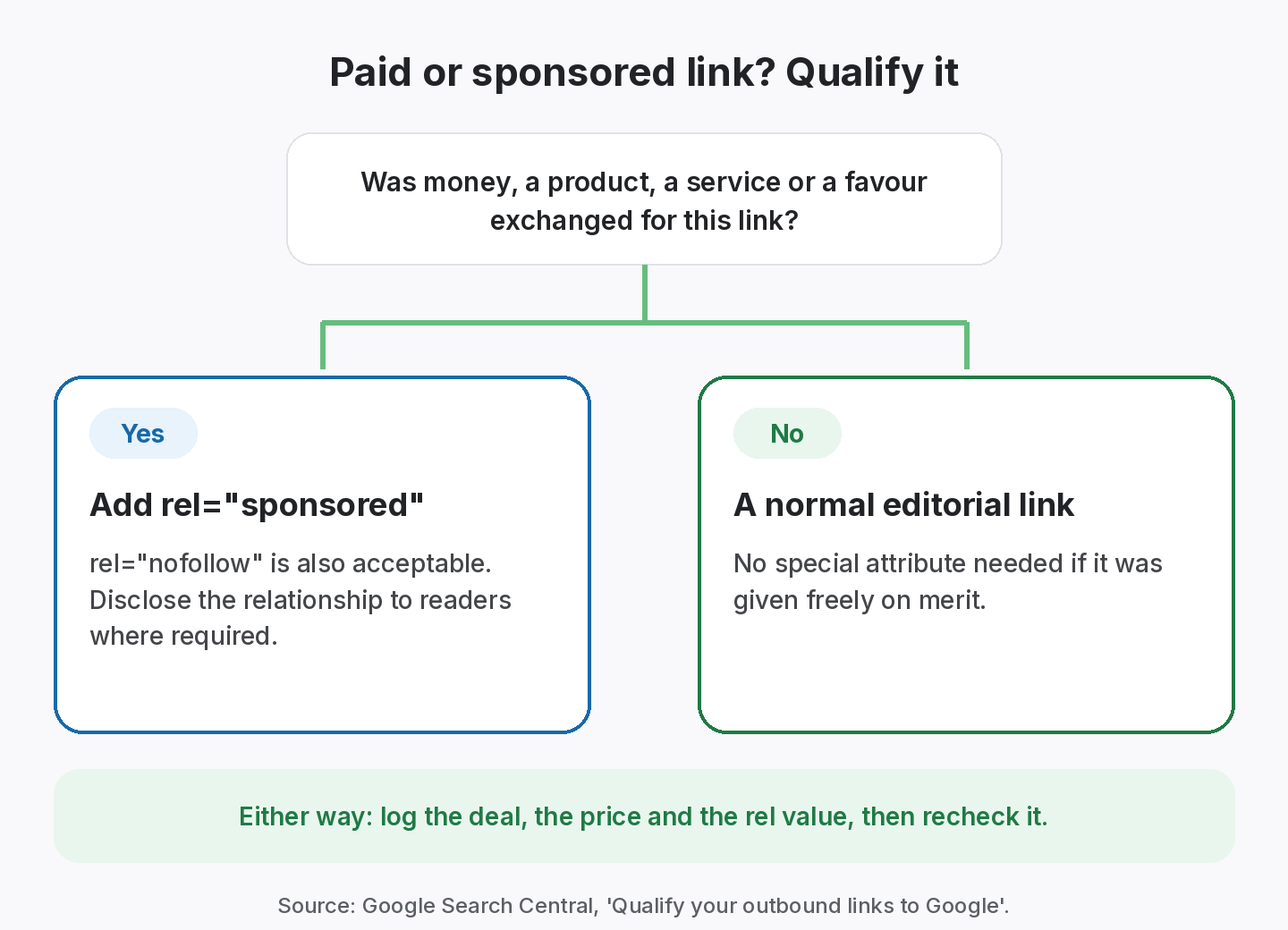
Key takeaways
- Google’s spam policies list buying or selling links for ranking purposes as link spam, including paying for links or posts that contain links.
- Google asks for paid links to carry rel=”sponsored”. rel=”nofollow” is also acceptable, but sponsored is preferred.
- Exchanging goods or services for links, or a free product in return for a review with a link, counts as payment too.
- Track the price, the agreed rel value and the live status of every paid link, and recheck them.
Are paid backlinks against Google’s rules? Google treats links bought for ranking purposes as link spam, but it does not ban sponsorship or advertising. Its rule is about markup: any link you get in exchange for money, products, services or other compensation should carry rel=”sponsored” (rel=”nofollow” is also accepted), so it doesn’t pass ranking credit. Sponsored placements can still bring traffic, audience and brand reach. The job is to buy them openly, qualify them correctly and track every one.
Google’s rules on paid backlinks at a glance
| Situation | Counts as paid? | Markup Google asks for |
|---|---|---|
| Fee for a link or sponsored post | Yes | rel=”sponsored” (nofollow accepted) |
| Free product in exchange for a review with a link | Yes | rel=”sponsored” (nofollow accepted) |
| Services or goods traded for a link | Yes | rel=”sponsored” (nofollow accepted) |
| Display ad or banner link | Yes | rel=”sponsored” |
| Editorial mention given freely on merit | No | No special attribute |
Paid placements work best when you buy them for reach and qualify them with rel=”sponsored”, but fall short when the only goal is ranking credit.
What counts as a paid backlink?
A paid backlink is any link that exists because someone was compensated for it. The obvious case is paying a site owner a fee to publish a link or a sponsored post. Google’s spam policies go further. In the link spam section, the examples of buying or selling links include:
- Exchanging money for links, or for posts that contain links.
- Exchanging goods or services for links.
- Sending someone a free product in exchange for them writing about it and including a link.
So “paid” is broader than an invoice. A sponsored listing, a link inside a paid newsletter placement, or a review written because you sent a free product all fall into the same category.
Paid backlinks: what Google says
Google doesn’t ban advertising or sponsorship. It asks that paid links be qualified so they don’t influence rankings. Its guide to qualifying outbound links says to mark links that are advertisements or paid placements with the sponsored value. It notes that the nofollow value was previously recommended for these links and is still acceptable, though sponsored is preferred.
Google introduced the sponsored and ugc values in 2019, in its post on evolving nofollow. That post also explained that all three values (nofollow, sponsored and ugc) are treated as hints about which links to consider, rather than strict directives. Google’s earlier reminder about selling links that pass PageRank set out the same principle from the publisher’s side: sites that sell links passing ranking credit risk their own standing in search.
Why a sponsored link can still be worth buying
A link marked sponsored is not a wasted spend if you bought it for the right reasons. It can send referral visitors, put your brand in front of a relevant audience, and support partnerships you’d value anyway. The mistake is buying links only for ranking credit and hiding that they were paid. That’s the part Google’s policy targets.
Track every paid link and its rel value
Record price, vendor and the agreed attribute, then recheck the placement.
How to track paid backlinks
Paid links are the easiest kind to lose money on, because you’ve already paid and nobody tells you when the link changes. A simple tracking routine prevents most of that.
- Agree terms in writing. Note the price, the page, the anchor, the rel value (sponsored or nofollow), the disclosure and how long the link should stay live.
- Log the deal the day you pay. Record vendor, price, currency, payment date, target URL and the agreed rel value alongside the link itself.
- Confirm the placement. When the link goes live, check that it points at the right page and carries the agreed attribute.
- Recheck on a schedule. Paid links are worth checking often. If a link goes missing, you need to know while the vendor still remembers the deal.
- Compare cost with outcome. Track referral traffic or leads from the link where you can, so next quarter’s budget goes to the placements that earned it.
- Keep records for every client. If you buy links for clients, keep each client’s deals separate and reportable.
What to record for every paid link
| Field | Why it matters |
|---|---|
| Vendor and contact | You know who to email when something changes |
| Price and payment date | Lets you work out cost per link and spot repeat spend |
| Source page and target URL | The exact placement you paid for |
| Agreed rel value | Confirms the link was qualified as sponsored or nofollow |
| Disclosure | Shows readers were told the content was sponsored |
| Status and last check | Active, Lost or Broken, and when you last confirmed it |
Worked example: auditing a quarter’s paid links
Sample data. The vendors, prices and results are invented to illustrate the process.
A marketing team at example-saas.com bought four sponsored placements last quarter. They log each one and run a check.
| Placement | Price | Agreed rel | Found rel | Status |
|---|---|---|---|---|
| news-site.example/tools-roundup | $300 | sponsored | sponsored | Active |
| blog-one.example/review | $150 | sponsored | none | Active |
| newsletter.example/issue-12 | $200 | sponsored | sponsored | Active |
| directory.example/listing | $80 | nofollow | nofollow | Lost |
Two issues stand out. The review on blog-one.example was published without the sponsored attribute, so the link now looks like an editorial link for a placement that was paid. The team asks the publisher to add rel=”sponsored”, as agreed. The directory listing has gone, so they ask the directory to restore it or refund the fee. Total spend is $730, and with the record in hand both conversations take a single email.
Red flags when buying sponsored placements
Not every site that sells placements is worth paying, even with the link correctly qualified. Before you agree a deal, look for these warning signs:
- “Dofollow guaranteed” offers. A seller who promises an unqualified link in exchange for payment is offering exactly what Google’s spam policies describe as link spam.
- No visible disclosure. If the site never labels sponsored content, readers can’t tell paid from editorial, and you can’t easily show the link was qualified.
- Content written only to hold links. Pages stuffed with unrelated outbound links rarely send visitors, and they reflect badly on everyone linked from them.
- Topics all over the place. A site publishing casino, crypto and gardening posts in the same week is selling to anyone, not serving an audience.
- Pressure to pay before agreeing details. Get the page, anchor, rel value and duration in writing first.
A good sponsored placement should pass a simple test: would you pay for it if it carried rel=”sponsored” from day one? If the answer is yes, it’s being bought for the audience, which is the right reason.
Common misunderstandings about paid backlinks
A few myths come up again and again when teams talk about paid links.
- “Nofollow makes the spend pointless.” Not if you bought the placement for an audience. Referral visits, brand searches and partnerships don’t depend on ranking credit.
- “Google can’t tell a link was paid.” Sometimes it can’t, but that is a bet, not a plan. Sites that openly sell links leave patterns, and Google’s policy also covers the publisher.
- “A free product isn’t payment.” Google’s own examples include sending a free product in exchange for a review with a link.
- “Guest posts are never paid links.” If a fee changes hands for publishing the post, the link inside is paid, whatever the page calls it.
- “Once live, a paid link stays live.” Publishers redesign, prune old posts and change attributes. Without a recheck you won’t know.
The common thread is that honesty and records solve most of the risk. If you can show what you paid for, how the link was marked and when it was last checked, you are in a far stronger position with clients and with search engines.
How to choose a sponsored placement
Most of the risk in paid links comes from what you buy, not the fact that you paid. Ask these questions before you agree a fee.
- Audience: would you pay for this placement if it carried no link at all? If yes, it is a sound marketing spend.
- Disclosure: will the publisher label the content as sponsored and use rel=”sponsored” or nofollow?
- Site behaviour: does the publisher openly sell “dofollow” links on a price list? That is a sign they ignore Google’s rules, and their links may already be discounted.
- Terms: is the link duration written down, along with what happens if it is removed early?
- Records: will you log the price, date, page and agreed rel value on the day you pay?
- Measurement: do you have a way to see referral visits or leads from the placement? See our guide to measuring link building ROI.
A placement that passes all six is one you can defend to a client, a finance team and Google’s guidelines.
How SEOENV helps you track paid links
The Paid Collaborations module in SEOENV is where you log each paid deal: the vendor, the price and the link. Every paid link also appears in the Link Tracker, where checks report its status and whether it is Dofollow or Nofollow, so a missing sponsored or nofollow attribute shows up as a type you didn’t expect. You can invoice clients for placements with the Invoice Generator.
Paid Collaborations is available on every plan, including Free, for up to 20 links with manual checks. Starter ($29 a month) adds automatic daily checks, the Link Status Report and the ROI Calculator for comparing cost with value. Read more on our paid link tracking page or compare plans on the pricing page.
One important note on scope: SEOENV records and checks links. It doesn’t decide what’s compliant for you. Whether a link should be sponsored is your call, based on the deal.
From the SEOENV team
The most common problem we came across in paid link work wasn’t a vendor disappearing. It was the attribute: a placement agreed as sponsored that went live without it, or an editorial link that was later switched to nofollow without notice. Both are only visible if you check the HTML, which is why we read the rel attribute on every check.
Sources
- Google Search Central: Spam policies for Google web search, link spam
- Google Search Central: Qualify your outbound links to Google
- Google Search Central Blog: Evolving “nofollow”: new ways to identify the nature of links
- Google Search Central Blog: A reminder about selling links that pass PageRank
How we wrote this guide
This guide is written by the SEOENV team from how link builders actually record exchanges, paid placements and guest posts. SEOENV makes a backlink manager, so we say where a spreadsheet or another tool is enough. We do not quote statistics we cannot source.
Frequently asked questions
Keep every link you build on record
Log exchanges, ABC swaps, paid links and guest posts in one place. The Free plan covers every link type for up to 20 links.


[…] No money. If anyone is paid, it’s a paid link and should carry rel=”sponsored”. See our paid backlinks guide. […]
[…] rel=”sponsored” marks links that are advertisements or paid placements. Nofollow is still accepted for paid links, but sponsored is preferred. See our paid backlinks guide. […]
[…] end of a quarter from invoices and inboxes is where most ROI reports lose accuracy. Our guide to paid backlinks and Google’s rules covers what else to log for paid […]
[…] links. If you pay, the link is paid and Google asks for rel=”sponsored”. Our guide to paid backlinks and Google’s rules explains […]
[…] and becomes a paid link, which Google asks you to qualify with rel=”sponsored”. Our paid backlinks guide covers […]