Nofollow vs Dofollow Links: What the Difference Really Is
Published on October 14, 2026 | 7 Min Read
Key takeaways
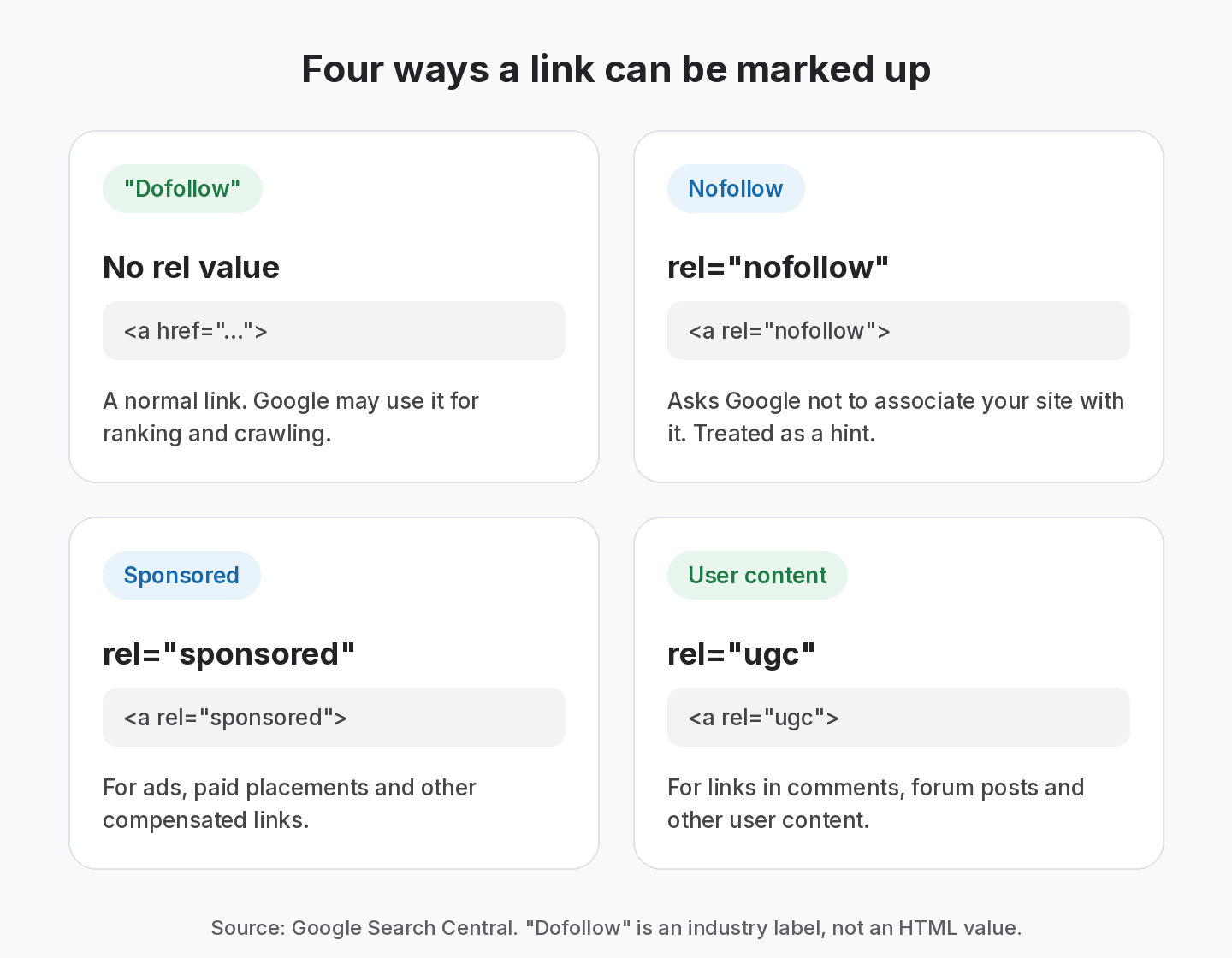
- “Dofollow” isn’t a real HTML value. It’s shorthand for a link without nofollow, sponsored or ugc.
- Google supports three rel values for outbound links: sponsored for paid links, ugc for user content and nofollow for everything else you don’t want to vouch for.
- All three are hints. Google may still use them for ranking, crawling and indexing.
- Nofollow links aren’t worthless: they can bring visitors and mentions. But if a link you were promised as dofollow changes to nofollow, that’s worth knowing.
The difference between nofollow and dofollow links is one HTML attribute. A “dofollow” link is simply a normal link with no rel value that limits it, so Google may use it for ranking and to discover pages. A nofollow link has rel=”nofollow”, which asks Google not to associate your site with the linked page. Since 2019, Google treats nofollow, along with the newer sponsored and ugc values, as a hint rather than a strict rule.
What is a dofollow link?
A dofollow link is an ordinary HTML link, like this:
- <a href=”https://example.com/guide”>example guide</a>
There’s no rel=”dofollow” attribute in HTML, and adding one does nothing. When SEO people say “dofollow”, they mean a link that doesn’t carry nofollow, sponsored or ugc, so it can pass ranking signals in the way Google’s link analysis normally works. Google’s link best practices describe how it uses links both to find new pages and as a signal of relevance.
What is a nofollow link?
A nofollow link carries the rel attribute with the value nofollow:
- <a rel=”nofollow” href=”https://example.com/guide”>example guide</a>
Google’s guide to qualifying outbound links says to use nofollow when the other values don’t apply and you’d rather Google didn’t associate your site with, or crawl, the linked page from your site.
rel=”sponsored” and rel=”ugc”
In September 2019, Google announced two more values in its post on evolving nofollow:
- rel=”sponsored” marks links that are advertisements or paid placements. Nofollow is still accepted for paid links, but sponsored is preferred. See our paid backlinks guide.
- rel=”ugc” marks links inside user-generated content, such as comments and forum posts.
You can combine values, for example rel=”ugc nofollow”.
See which of your links are dofollow
Every link you log gets a type and status. Free for up to 20 links.
Nofollow vs dofollow at a glance
| Question | Dofollow (no rel value) | Nofollow |
|---|---|---|
| HTML | <a href=”…”> | <a rel=”nofollow” href=”…”> |
| What it tells Google | Nothing special, a normal link | Don’t associate my site with this page |
| Treated as | A normal link | A hint since 2019 |
| Typical uses | Editorial links, citations | Links you can’t vouch for |
| Right for paid links? | No | Accepted, but sponsored is preferred |
| Can bring visitors? | Yes | Yes |
Two other values often appear in the same rel attribute: noopener and noreferrer. They are about browser security and referrer data, not search, and don’t make a link nofollow. MDN’s reference on the rel attribute lists what each value does.
Nofollow is a hint, not a block
Before 2019, nofollow links were generally not used for ranking at all. Google’s 2019 announcement changed that. All three values are now hints about which links to consider or exclude. For ranking, the change applied immediately. For crawling and indexing, Google said nofollow would become a hint as of 1 March 2020.
In practice, this means two things. Marking a link nofollow doesn’t guarantee Google ignores it. And a nofollow link isn’t automatically worthless, because Google may still take it into account. What hasn’t changed is the purpose: the attributes tell Google how you relate to the link.
Are nofollow links good for SEO?
They have value, just a different kind. A nofollow link on a busy, relevant page can send real visitors, introduce your brand to a new audience and lead to editorial links later. A healthy backlink profile usually includes both, because that’s what naturally happens on the web: comments, forums, sponsored content and many large publishers use nofollow by default.
What you shouldn’t do is treat a nofollow link as equal to a dofollow link in a deal. If you agreed an editorial dofollow link in a guest post or exchange, and it later becomes nofollow, the terms of that deal have changed.
When to use nofollow on your own site
The attributes aren’t only something you check on other people’s pages. Google’s guidance applies to the links you publish too. A few common situations:
- Comments and forum posts on your site should use rel=”ugc”, so you aren’t vouching for every link a visitor adds.
- Affiliate links, sponsored posts and ads should use rel=”sponsored”. This includes reviews written because you received a free product.
- Links you don’t want to vouch for, such as a source you’re citing as a bad example, can use rel=”nofollow”.
- Normal editorial links to sources you trust need no attribute. Adding nofollow to every outbound link isn’t required, and linking openly to good sources is part of being a helpful page.
If you run partner pages or exchanges, the same logic applies to your side. Linking out naturally and honestly is the best way to make sure the links you receive are judged the same way.
How to check if a link is nofollow or dofollow
- Open the page where the link sits.
- Right-click the link and choose Inspect (or view the page source and search for your URL).
- Read the rel attribute on the <a> tag. If it contains nofollow, sponsored or ugc, it’s qualified. If there’s no rel, or only values such as noopener, it’s a normal (“dofollow”) link.
- Check the page-level robots meta tag too. A page with <meta name=”robots” content=”nofollow”> applies nofollow to all its links. Google’s robots meta tag documentation explains this.
- Record what you found, with the date, so you can tell if it changes.
Worked example: catching a quiet switch to nofollow
Sample data. The domains and results are invented to illustrate the process.
An agency tracks five links for a client. All five were agreed as editorial dofollow links. A routine check gives these results:
| Source page | Agreed | Found | Status |
|---|---|---|---|
| partner-blog.example/guide | Dofollow | Dofollow | Active |
| industry-news.example/roundup | Dofollow | Nofollow | Active |
| tools-list.example/best-apps | Dofollow | Dofollow | Active |
| guest-site.example/how-to | Dofollow | Dofollow | Active |
| community.example/thread-12 | Nofollow (ugc) | Nofollow | Active |
Every link is still live, so a simple “is it there?” check would pass. But the industry-news.example link has changed from dofollow to nofollow. The agency checks the site and finds a new sitewide policy of nofollow on outbound links. Because it’s a policy, not a mistake, they note the change in the client’s report and adjust the value they place on the link, rather than asking for a reversal. The community link was nofollow from the start, as expected for user content. Over the next quarter, the agency adds the new policy to its notes on that publisher, so future pitches to the site are valued with nofollow in mind from the start.
Nofollow vs dofollow for different link types
How much the attribute matters depends on why the link exists. Here is how we think about it for the links SEO teams build most.
| Link type | Typical attribute | What to record |
|---|---|---|
| Editorial mention | Normal link | Source page, anchor, date found |
| Link exchange | Normal link if relevant, agreed in writing | Both sides, agreed rel value |
| Paid placement | rel=”sponsored” (nofollow accepted) | Price, vendor, agreed rel value |
| Guest post | Often normal; sponsored if a fee was paid | Article URL, editor, rel value |
| Directory listing | Often nofollow | Listing URL, renewal date |
| Comment or forum post | rel=”ugc” | Usually not worth tracking |
The point isn’t to chase normal links everywhere. A nofollow link on a busy, relevant page can be worth far more to the business than a normal link on a page nobody visits. What matters is that the attribute matches the agreement, and that you notice when it changes. Our guide to why backlinks disappear covers attribute switches alongside other kinds of link loss.
How to choose the right rel value
When you publish a link, or agree one with a partner, pick the attribute with this checklist.
- Was anything exchanged for the link? Money, products, services or a swap: use rel=”sponsored” (nofollow is accepted).
- Did a user add it? Comments, forum posts, reviews: use rel=”ugc”.
- Do you not want to vouch for the page? Use rel=”nofollow”.
- Is it an editorial link you chose on merit? Leave it as a normal link with no rel value.
- Can you combine values? Yes. Google accepts combinations such as rel=”ugc nofollow”.
- Did a partner agree a normal link? Record that in the deal so you can spot a later switch to nofollow.
When in doubt about a commercial link, qualify it. A sponsored label costs you nothing with readers and protects both sites.
How SEOENV tracks link types
Every link you log in SEOENV appears in the Link Tracker with a status (Active, Pending, Lost or Broken) and a type: Dofollow, Nofollow or Unknown. Each check reads the link’s rel attribute, so a switch like the one in the example shows up without anyone inspecting HTML. Run Check all on any plan, or let Starter and above check automatically each day.
Free covers every link type for up to 20 links with manual checks. Starter ($29 a month) adds daily checks and the Link Status Report. Read more on our backlink monitoring page, or see the pricing page.
From the SEOENV team
Lost links get noticed eventually, because a missing link is easy to spot. Nofollow switches are different. The link still looks fine on the page, so they can go unnoticed for months. That’s why we treat the link type as part of a link’s status, not a one-off detail.
Sources
- Google Search Central: Qualify your outbound links to Google
- Google Search Central Blog: Evolving “nofollow”: new ways to identify the nature of links
- Google Search Central: Robots meta tag, data-nosnippet and X-Robots-Tag specifications
- MDN Web Docs: HTML attribute: rel
How we wrote this guide
This guide is written by the SEOENV team from how link builders actually record exchanges, paid placements and guest posts. SEOENV makes a backlink manager, so we say where a spreadsheet or another tool is enough. We do not quote statistics we cannot source.
Frequently asked questions
Keep every link you build on record
Log exchanges, ABC swaps, paid links and guest posts in one place. The Free plan covers every link type for up to 20 links.


[…] Nofollow vs dofollow links →How to measure link building ROI →Paid link tracking → […]
[…] Previous Next […]
[…] nofollow vs dofollow for what each value […]
[…] guidance. If it was an editorial link or an agreed exchange, it changes the deal. See nofollow vs dofollow for what each value […]
[…] is visibility, referral visits and accurate business information, not ranking credit. See our nofollow vs dofollow guide for […]
[…] grade, since paid links should be sponsored, but it shows whether links match agreements. See nofollow vs dofollow for […]
[…] or nofollow. If either side was paid in any way, Google asks for rel=”sponsored”. Our nofollow vs dofollow guide explains the […]
[…] none (a normal link), nofollow, sponsored or ugc. Record what was agreed and what you found. Our nofollow vs dofollow guide explains […]